I didn't think one survey could matter. Turns out it does.
— Chase J., Pre-Med Student

Your opinion matters

Student feedback helps instructors develop, modify, and improve their courses for future students like you.

Learn more

First, check your course dates and evaluation window. If open, start your evaluation below.

Check dates

Opens Blackboard, where you'll log in and choose your course evaluation.

Never miss your evaluation dates

Choose the option that matches your course schedule, then add a reminder to your calendar.

Choose your course length
COURSE DATES
EVAL WINDOW

We'll add a reminder 3 days before your window closes. You can move it earlier or later in your calendar if needed.

Where to find your course evaluations in Blackboard

Open Blackboard and select “Course Evaluations” from the left-hand menu.
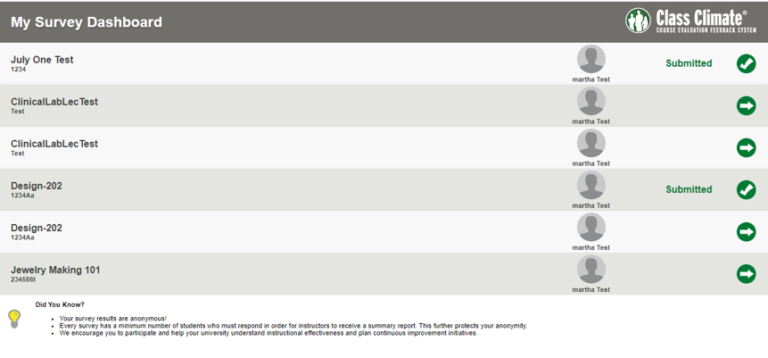
Student Evaluation Panel in Blackboard
Example: Student Evaluation Panel in Blackboard (click to expand)
Course Evaluations with R.B. – Spring 2026
Course Evaluations with R.B.
ACC Teaching & Learning Excellence
4:32
Watch in Spanish
Evaluation windows vary by course length. Find your course type in the Evaluation Windows section below, then check your open window dates.
Log into Blackboard, navigate to "Course Evaluations" in the left sidebar, and select the evaluation for the course you want to review. Takes about 5 minutes.

Evaluation windows

See your course dates and when evaluations are open.

Course evaluation forms

Use these forms if your evaluation isn't available in Blackboard.

Frequently asked questions

Common questions about course evaluations.

This is likely because the survey is not open yet. Check the evaluation windows above to see if your survey is currently open. If it is during your survey period and you still don't see it, contact facultyevaluation@austincc.edu – our staff will look into it.
This can be caused by settings on your mobile device. We strongly suggest switching to another device or browser. Most questions follow: Strongly disagree → Disagree → Neither → Agree → Strongly agree → Not Applicable.
We're unable to extend surveys – doing so affects all students in the course. You can still share feedback directly with your instructor or department chair via the ACC directory.
Student feedback helps instructors develop, modify, and improve their courses. Departments use evaluation results when assessing teaching effectiveness – your input directly shapes education quality at ACC.
The instructor hasn't added the link yet. Ask them to follow the video tutorial. Alternatively, use the direct forms in the Course Evaluation Forms section above.

Need help with your evaluation?

Need help accessing your evaluation or finding your survey? We can help.

Email our team Visit the help center
Select course length
Select the option that matches your course start and end dates
Evaluation windows
Select a term to view course evaluation dates.